Introduction
As a Network Engineer or Support Engineer, you may often receive complaints from users regarding slow internet connectivity.
In many cases, Internet Service Providers (ISPs) claim that the bandwidth is working as expected, while users continue to experience poor performance.
Most engineers perform speed tests from a desktop or laptop browser. However, this method measures performance through multiple devices such as firewalls, core switches, access switches, and security policies.
As a result, it becomes difficult to determine the actual internet speed being delivered by the ISP.
A better approach is to perform a speed test directly from the Cisco IOS-XE router where the ISP connection terminates.
This helps verify the exact speed received from the service provider without interference from other network devices.
Prerequisites
Before proceeding, ensure the following requirements are met:
- Cisco IOS-XE Router
- Internet connectivity on WAN interface
- Guestshell support enabled
- NAT configuration for Guestshell traffic
- DNS resolution working properly
Network Topology
In this example:
- GigabitEthernet0/0/0 = WAN Interface
- GigabitEthernet0/0/1 = LAN Interface
- VirtualPortGroup0 = Guestshell Interface
Step 1 - Configure VirtualPortGroup Interface
Create a VirtualPortGroup interface that will be used by Guestshell.
conf t

iox

interface VirtualPortGroup0

 ip address 192.168.35.1 255.255.255.252

 ip nat inside

exit
This interface acts as the gateway between the router and Guestshell environment.
Step 2 - Configure Guestshell Network Parameters
Configure Guestshell networking and DNS settings.
app-hosting appid guestshell

 app-vnic gateway1 virtualportgroup 0 guest-interface 0

 guest-ipaddress 192.168.35.2 netmask 255.255.255.252

 app-default-gateway 192.168.35.1 guest-interface 0

 name-server0 8.8.8.8

 name-server1 1.1.1.1

exit
These settings provide Guestshell with IP connectivity and DNS resolution.
Step 3 - Configure NAT
Guestshell traffic must be translated before accessing the internet.
Create a NAT ACL and overload traffic through the WAN interface.
ip access-list standard NAT

 permit 192.168.35.0 0.0.0.3

exit

ip nat inside source list NAT interface GigabitEthernet0/0/0 overload
This allows Guestshell traffic to access external internet resources.
Step 4 - Enable Guestshell
After completing the configuration, enable Guestshell.
guestshell enable
The initialization process may take a few minutes depending on the router platform.
Verify Guestshell Status
show app-hosting list

show app-hosting detail appid guestshell
Verify that Guestshell is running before proceeding.
Step 5 - Access Guestshell
Launch Guestshell from the router CLI.
guestshell
You should now enter the Linux shell environment running inside Cisco IOS-XE.
Step 6 - Download Speedtest CLI
Download the Speedtest Python script directly from GitHub.
wget -O speedtest-cli \
https://raw.githubusercontent.com/sivel/speedtest-cli/master/speedtest.py
Make the file executable.
chmod +x speedtest-cli
Step 7 - Run Internet Speed Test
Execute the Speedtest utility.
python3 speedtest-cli --share
The command performs:
- Ping Test
- Download Speed Test
- Upload Speed Test
- Shareable Result Generation
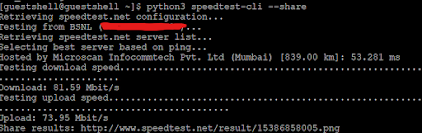
Example Output
After completion, Speedtest CLI generates a result similar to the following:
The generated URL can be opened in a browser to view the graphical Speedtest report.
Troubleshooting Tips
If the speed test fails, verify the following:
- Guestshell is running properly.
- DNS servers are reachable.
- NAT configuration is correct.
- WAN interface has internet connectivity.
- Firewall policies are not blocking traffic.
Benefits of Router-Based Speed Testing
- Eliminates client-side limitations.
- Bypasses LAN congestion issues.
- Validates ISP bandwidth directly.
- Useful during ISP troubleshooting.
- Provides accurate WAN performance measurements.
Conclusion
Performing a speed test directly from a Cisco IOS-XE router is an effective way to verify ISP bandwidth and troubleshoot internet performance issues. By leveraging Guestshell and Speedtest CLI, network engineers can quickly isolate WAN-related problems and gather reliable performance statistics directly from the edge router.
Ask Your Doubt