What is ARP?
ARP (Address Resolution Protocol) is a protocol used to resolve an IPv4 address into a MAC address within the same broadcast domain.
Whenever a device wants to communicate with another device on a local network, it must know the destination MAC address before sending Ethernet frames.
ARP helps devices discover the MAC address associated with a destination IP address.
Why Do We Need ARP?
Devices communicate using IP addresses at Layer 3, but switches forward traffic using MAC addresses at Layer 2.
Without knowing the destination MAC address, a device cannot build a complete Ethernet frame.
ARP bridges this gap by converting an IP address into a MAC address.
Example Network Topology
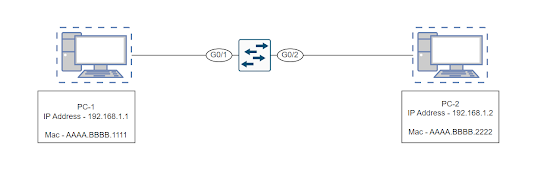
Assume PC-1 wants to communicate with PC-2.
- PC-1 IP Address: 192.168.1.10
- PC-1 MAC Address: AA-AA-AA-AA-AA-AA
- PC-2 IP Address: 192.168.1.20
- PC-2 MAC Address: BB-BB-BB-BB-BB-BB
Both devices are connected to the same switch and belong to the same subnet.
Step 1: PC-1 Checks ARP Cache
Before sending traffic, PC-1 first checks its ARP table (ARP Cache).
If an entry already exists for 192.168.1.20, communication can start immediately.
If no entry exists, PC-1 must initiate the ARP process.
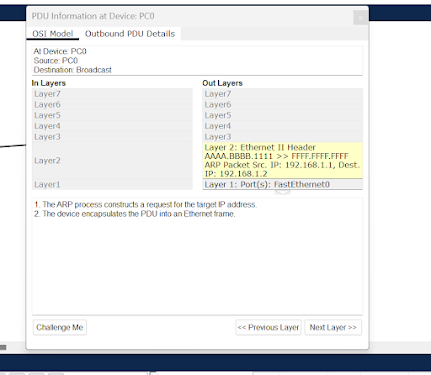
Step 2: ARP Request
PC-1 sends an ARP Request asking:
Who has 192.168.1.20?
Tell 192.168.1.10
The ARP Request is sent as a Broadcast Frame.
Destination MAC Address:
FF:FF:FF:FF:FF:FF
Because the destination MAC is broadcast, every device connected to the switch receives the frame.
ARP Request Packet Details
Source IP      : 192.168.1.10
Destination IP : 192.168.1.20

Source MAC     : AA-AA-AA-AA-AA-AA
Destination MAC: FF-FF-FF-FF-FF-FF
Step 3: Switch Behaviour
The switch receives the broadcast frame.
Since the destination MAC address is a broadcast address, the switch floods the frame out of all ports except the port where it was received.
Every device on the local network receives the ARP Request.
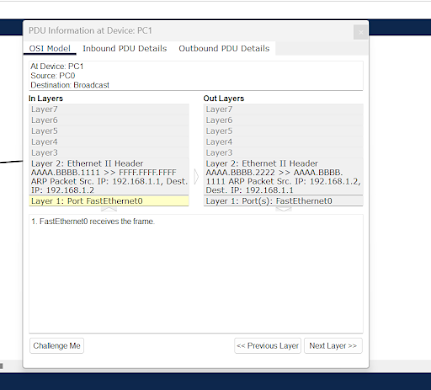
Step 4: PC-2 Receives ARP Request
PC-2 examines the ARP Request.
Since the requested IP address matches its own IP address (192.168.1.20), PC-2 prepares an ARP Reply.
Other devices simply ignore the request.
Step 5: ARP Reply
PC-2 sends a Unicast ARP Reply directly back to PC-1.
192.168.1.20 is at BB-BB-BB-BB-BB-BB
Unlike ARP Requests, ARP Replies are not broadcast.
They are sent directly to the requesting device.
ARP Reply Packet Details
Source IP      : 192.168.1.20
Destination IP : 192.168.1.10

Source MAC     : BB-BB-BB-BB-BB-BB
Destination MAC: AA-AA-AA-AA-AA-AA
Step 6: ARP Cache Update
PC-1 receives the ARP Reply and stores the information in its ARP Cache.
192.168.1.20 → BB-BB-BB-BB-BB-BB
Future communication can now occur directly without sending another ARP Request until the ARP cache entry expires.
ARP Process Summary
- PC-1 wants to communicate with PC-2.
- PC-1 checks ARP Cache.
- No entry found.
- PC-1 sends Broadcast ARP Request.
- Switch floods the request.
- PC-2 responds with Unicast ARP Reply.
- PC-1 updates ARP Cache.
- Communication begins.
Important Interview Questions
Is ARP Request Broadcast or Unicast?
ARP Request is Broadcast.
Is ARP Reply Broadcast or Unicast?
ARP Reply is Unicast.
At which layer does ARP operate?
ARP operates between Layer 2 and Layer 3.
Does ARP work in IPv6?
No. IPv6 uses Neighbor Discovery Protocol (NDP) instead of ARP.
Conclusion
ARP is one of the most fundamental protocols in networking. Understanding ARP Requests, ARP Replies, ARP Cache, MAC address resolution, and switch flooding behaviour is essential for every network engineer.
Ask Your Doubt